Google Maps vs Bing Maps: Which Gives Better Business Data?
We ran 40 scrapes across America's 10 largest cities to find out what a Google Maps scraper misses — and whether adding Bing Maps changes the picture for lead generation.
If you're running outbound prospecting with a maps scraper, you're almost certainly pulling from Google Maps. It's the default. It's where the volume is. And for most sales and marketing teams building lead lists, it feels like enough.
We wanted to test that assumption with real data.
We used Maps Lead Scraper — a Chrome extension that works as both a Google Maps scraper and a Bing Maps scraper — to run 40 identical searches across both platforms. Same cities. Same search query. Same tool. The goal: find out how much overlap actually exists between Google Maps and Bing Maps business listings, and whether scraping both platforms produces meaningfully better lead data than scraping just one.
The short answer: the overlap is far smaller than we expected. Only 10% of mortgage broker listings appeared on both platforms. That means 90% of the leads we found were exclusive to one search engine. For anyone doing data scraping from Google Maps alone, the blind spot is significant.
Here's everything we found.
How We Did It
We used Maps Lead Scraper to search "mortgage broker" across 10 US cities — New York, Los Angeles, Chicago, Houston, Phoenix, Philadelphia, San Antonio, San Diego, Dallas, and San Jose — in March 2026. We ran 4 scrapes per city (Google Maps on Chrome, Google Maps on Edge, Bing Maps on Chrome, Bing Maps on Edge) for 40 total runs. The extension extracted business name, address, phone, website, email, and star rating per listing. Every email address was run through built-in verification to confirm deliverability. Results were deduplicated by business name to identify unique listings and platform overlap.
The exact process, step by step:
2. Search "mortgage broker" on Google Maps — repeat for each city
3. Repeat the same searches on Bing Maps
4. Click "Scrape" — extension extracts all visible listings
5. Export to CSV — business name, address, phone, website, email, star rating
6. Emails auto-verified — deliverable addresses marked as verified
7. Deduplicate by business name to find overlap between platforms
Key Findings: The Numbers
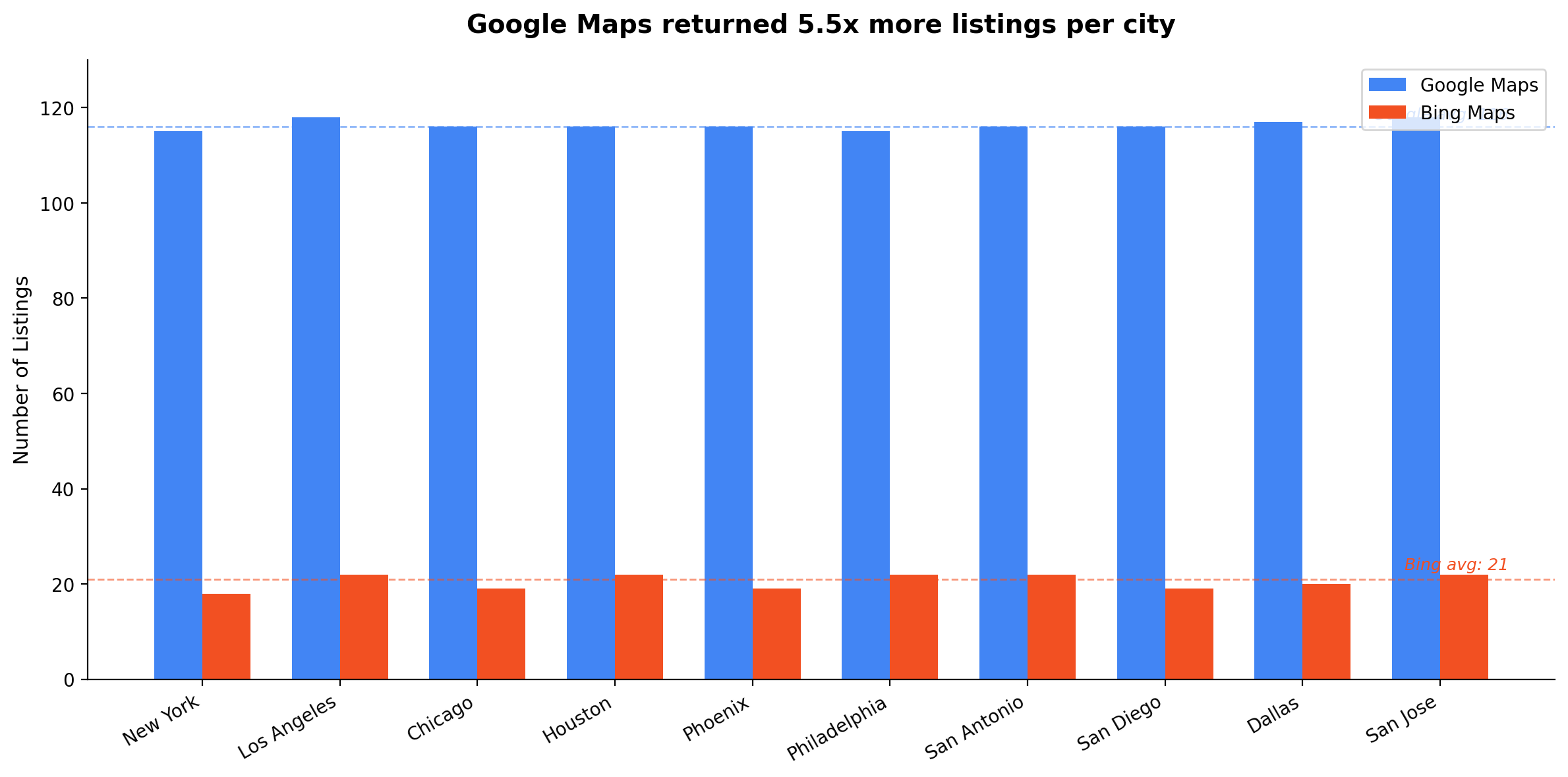
Google Maps returns 5.5x more listings than Bing Maps
The volume difference is substantial. Across all 10 cities, our Google Maps data scraper returned 1,163 total listings compared to 205 from Bing Maps. That's an average of 116 listings per city on Google vs 21 on Bing.
If raw volume is your only metric, Google Maps wins decisively. For sales teams building the largest possible prospect list from a single platform, web scraping Google Maps is the clear starting point.
But volume alone doesn't tell the full story.
Only 10% overlap — 90% of leads are exclusive to one platform
This is the headline finding. Across 10 cities, only 118 of the 1,220 unique businesses we found appeared on both Google Maps and Bing Maps. That's a 9.7% average overlap rate.
Put differently: 90% of the mortgage brokers in our dataset existed on only one platform. Google Maps had 1,028 exclusive listings. Bing Maps had 74 exclusive listings — businesses that did not appear on Google at any point in the study.
Those 74 Bing-exclusive leads represent prospects that anyone relying solely on a Google Maps scraper extension will never see. Your competitors who only scrape Google are working from the same incomplete list. The businesses on Bing represent a genuinely untapped channel.
At a 60% email extraction rate, those 74 Bing-exclusive businesses translate to roughly 44 verified email addresses your competition doesn't have.
City-level overlap: New York and Chicago show just 6%
The overlap rate varied by city, but the dual-platform advantage held everywhere:
| City | Bing | Overlap | Overlap % | Google Only | Bing Only | |
|---|---|---|---|---|---|---|
| New York | 115 | 18 | 7 | 6% | 104 | 7 |
| Los Angeles | 118 | 22 | 14 | 12% | 99 | 6 |
| Chicago | 116 | 19 | 8 | 6% | 107 | 9 |
| Houston | 116 | 22 | 15 | 12% | 100 | 7 |
| Phoenix | 116 | 19 | 12 | 10% | 103 | 6 |
| Philadelphia | 115 | 22 | 12 | 10% | 102 | 11 |
| San Antonio | 116 | 22 | 13 | 11% | 103 | 7 |
| San Diego | 116 | 19 | 11 | 9% | 106 | 9 |
| Dallas | 117 | 20 | 12 | 10% | 105 | 6 |
| San Jose | 118 | 22 | 14 | 12% | 99 | 6 |
| Total | 1,163 | 205 | 118 | 10% | 1,028 | 74 |
New York and Chicago — two of the most competitive markets in the country — had the lowest overlap at just 6%. In these cities, Google Maps and Bing Maps function as almost entirely separate lead databases. For NYC mortgage broker prospecting, running only Google means missing nearly every lead that Bing surfaces.
Philadelphia had the highest number of Bing-exclusive listings at 11, making it the city where adding a Bing Maps scraper to your workflow delivers the most incremental value.
Google-only vs Bing-only vs Overlap — by city
Email extraction rates are virtually identical across both platforms
We expected Bing's smaller listing pool to produce lower-quality data. The opposite was true.
| Platform | Listings | Emails Found | Email Rate | Verified | Verification Rate |
|---|---|---|---|---|---|
| Google Maps | 1,163 | 705 | 60.6% | 678 | 96.2% |
| Bing Maps | 205 | 127 | 62.0% | 121 | 95.3% |
Google Maps: 60.6% email extraction rate (705 emails from 1,163 listings). Bing Maps: 62.0% email extraction rate (127 emails from 205 listings). The difference is negligible.
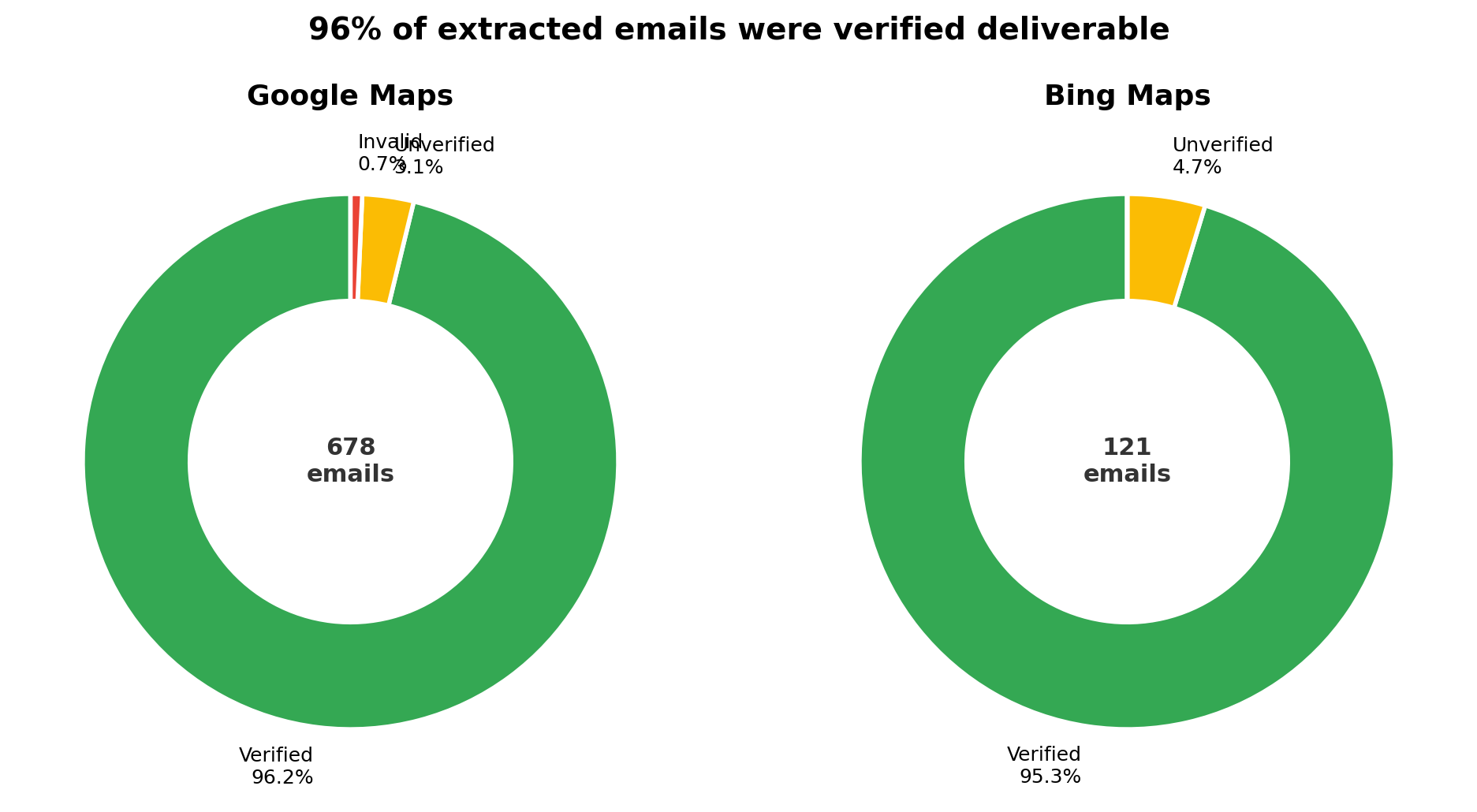
Of the emails found, 96.2% from Google and 95.3% from Bing were verified deliverable. That's a combined 799 verified emails ready for outreach — not junk data that burns your sender reputation, but addresses confirmed through Maps Lead Scraper's built-in three-layer verification pipeline.
Bing listings aren't lower quality. Every Bing-exclusive business carries the same 60%+ chance of yielding a verified email as a Google listing. There's no quality trade-off for adding a second platform.
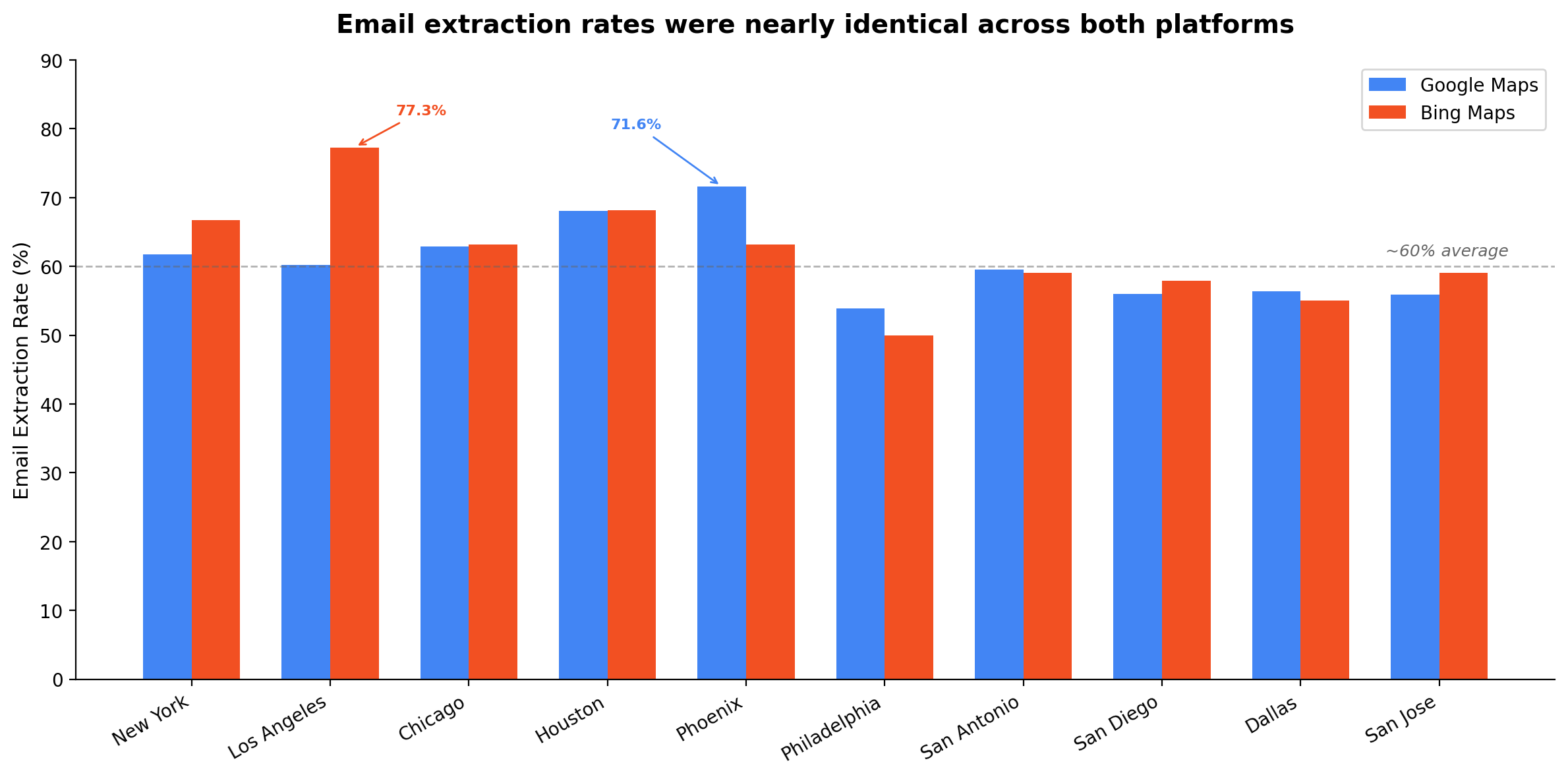
Email extraction by city
| City | Google Email Rate | Bing Email Rate | Google Verified | Bing Verified |
|---|---|---|---|---|
| New York | 61.7% | 66.7% | 70 | 12 |
| Los Angeles | 60.2% | 77.3% | 67 | 16 |
| Chicago | 62.9% | 63.2% | 68 | 11 |
| Houston | 68.1% | 68.2% | 76 | 15 |
| Phoenix | 71.6% | 63.2% | 77 | 11 |
| Philadelphia | 53.9% | 50.0% | 60 | 11 |
| San Antonio | 59.5% | 59.1% | 67 | 13 |
| San Diego | 56.0% | 57.9% | 64 | 11 |
| Dallas | 56.4% | 55.0% | 64 | 10 |
| San Jose | 55.9% | 59.1% | 65 | 11 |
Phoenix led Google's email rates at 71.6%, while Los Angeles led Bing's at 77.3%. City-level variation matters for prospecting strategy, but both platforms consistently delivered actionable contact data regardless of market.
Bing has 100% website coverage; Google has 94%
Every single Bing listing (205/205) included a website URL. Google had 94% website coverage (1,094/1,163). Phone number coverage was near-identical: Bing 99.0% vs Google 98.5%.
Bing's perfect website coverage means every listing can be followed up with email extraction from the business website. For Google, roughly 6% of listings lack a website URL, making email discovery harder for those leads. Bing's smaller pool is more complete.
Google provides star ratings; Bing does not
Google returned star ratings for 96.8% of listings, ranging from 3 to 5 stars. Bing returned zero ratings across all listings.
For outbound prospecting, Google's rating data lets you prioritise leads — a 5-star mortgage broker with 50+ reviews is a more established, potentially higher-value target than an unrated one. This is a genuine Google advantage that Bing can't match, but the Bing leads themselves are still contactable and valuable.
Chrome vs Edge: no meaningful difference
For Google Maps, Chrome and Edge returned identical listings and near-identical email counts in every city. For Bing Maps, minor variations appeared (e.g., Philadelphia: 22 on Chrome vs 23 on Edge), but email extraction rates were consistent.
Browser choice doesn't affect results. You can use whichever browser you prefer without worrying about data quality differences.
What This Means for Lead Generation
If you're a sales or marketing professional building outbound prospecting lists from maps data, this study proves one thing: you need both platforms.
Google Maps is the volume leader — no question. But the data reveals a blind spot most prospectors don't know they have. Google and Bing Maps draw from substantially different business databases. Many businesses are listed on one but not the other. This isn't a rounding error — it's a structural difference in how these platforms index local businesses.
We expected Bing's smaller listing pool to produce weaker data. Instead, Bing matched or exceeded Google on email extraction rates and website coverage. The leads from Bing aren't second-class — they're leads from a different source with the same conversion potential.
1,220 unique businesses. 799 verified emails. One search query. One afternoon.
At a conservative 2% cold email conversion rate, that's 16 new client conversations from a single prospecting session.
What could this mean for your pipeline?
Results depend on your outreach quality, offer, and market. This is illustrative based on conservative industry conversion rates.
Why You Should Scrape Both Maps Platforms
Most Google Maps lead scraper tools only cover one platform. That made sense when Bing Maps was an afterthought. But the data shows Bing isn't redundant — it's complementary.
Here's what a dual-platform approach gives you:
- More total leads: 1,220 unique businesses vs 1,163 from Google alone — a modest but real increase.
- Exclusive leads your competitors miss: 74 businesses that don't appear on Google at any point. If your competitors only scrape Google (and most do), these are prospects they'll never see.
- Higher data completeness: Bing's 100% website coverage fills gaps where Google listings lack a website URL.
- Same email quality: No trade-off in email extraction or verification rates.
The best Google Maps scraper is one that also covers Bing. Leaving Bing out means leaving leads on the table — leads that are just as contactable, just as valuable, and invisible to single-platform workflows.
How to Scrape Google Maps and Bing Maps
Maps Lead Scraper is a Google Maps scraper Chrome extension that covers both platforms. The workflow is the same regardless of which maps site you're on:
That's it. The same Google Maps scraper extension works identically on Bing Maps. Run your search on Google first, then repeat it on Bing to capture the exclusive listings. Deduplicate and you have the most complete prospect list available.
Maps Lead Scraper is $49 one-time — no subscription, no per-lead fees.
What This Study Covers (and Doesn't)
We believe in transparency about our methodology. Here's what you should know:
- Single industry: This study covers mortgage brokers only. Overlap rates, listing volumes, and email rates may differ for other industries (restaurants, plumbers, dentists, etc.).
- US cities only: All 10 cities are large US metros. Results may differ in smaller cities, rural areas, or international markets.
- Point-in-time data: Collected on March 10, 2026. Maps listings change as businesses open, close, and update their profiles.
- Name-based deduplication: Overlap was calculated by matching business names. Some businesses may appear under slightly different names on each platform, meaning the true overlap could be marginally higher than 10%.
- Email extraction depends on websites: The 60% email rate reflects what can be extracted from linked business websites. Businesses without a website, or with emails behind contact forms, show as "Not Found" regardless of platform.
These are scope limitations, not flaws. Every finding in this study is reproducible using the same tool and methodology we described.
FAQ
This study was conducted using Maps Lead Scraper, the only Chrome extension that scrapes both Google Maps and Bing Maps. All data was collected on March 10, 2026 and is fully reproducible. For tools and methodology, visit our comparison page or try Maps Lead Scraper for yourself.